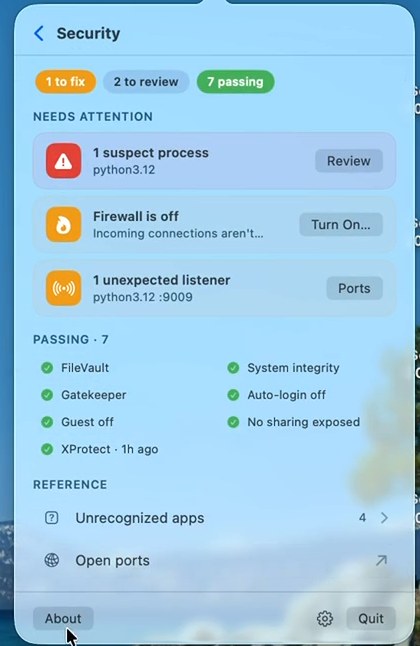
Real screenshot from the current release. Click to zoom.
Mojo Pulse / Tools / Security review
Security reviewmacOS ships with excellent protections — when they're on. Pulse checks them continuously, watches the doors nobody thinks about, and triages what it finds into three honest piles: fix, review, passing.
Real screenshot from the current release. Click to zoom.
FileVault encryption, System Integrity Protection, Gatekeeper, the application firewall, automatic login, the guest account, and whether XProtect — macOS's built-in malware scanner — is current and actually scanning. Green means checked, not assumed. And when something drifts off, the card's button takes you to the exact System Settings pane that fixes it, not a support article.
Pulse quietly classifies everything running by trust: recognized software stays silent, unfamiliar-but-harmless code sits in a review shelf, and genuinely suspect processes raise a card. The strongest signal is impersonation — a process wearing a trusted brand's name without that brand's signature. Combinations matter too: unsigned code in a hidden folder, brand-new arrivals that immediately start talking to the network. You can inspect, trust, or quit a process right from the alert.
SSH, Screen Sharing, or File Sharing reachable from beyond your Mac. A development server bound to 0.0.0.0, serving your project to the entire coffee shop — Pulse quotes the one-line fix. New login items that appeared since your baseline, because persistence is how unwanted software survives reboots. Each finding is individually ignorable, so your own tools alert once, not forever.
The process explorer shows the verified legal name behind every signed binary, and can confirm App Store apps against Apple's public catalog. When Pulse says a process belongs to Google, that's the certificate talking — not the process's self-reported name.
The security review is one of eighteen tools in the free download. 9.5 MB, notarized by Apple.
Keep exploring: Bluetooth sonar · Network health · all 18 tools